Automating Appointment Bookings with AI
Stop chasing calendars. Learn how the Audiva AI agent handles scheduling end-to-end, from the first ring to the confirmed booking, so your team can focus on closing

Every entrepreneur starts a business thinking that he will be a one-man army and will be able to run his business with a few people to assist him. As a beginner, it seems feasible too, owing to less work pressure and cost management. However, as the businesses grow, pressure starts increasing with no clear profit for the business, which makes him stressed. And among many hidden bottlenecks, appointment bookings become the foremost, losing potential customers even before the initial discussion. Prospects call during off-hours, get voicemail, and never call back. Some business leaders get the basic scheduling software that somehow helps, but only if someone is still available to manage it. Thus, AI agents are the need of the hour for all growing businesses to automate bookings and streamline all appointments smoothly.
An Overview of AI Scheduling
The AI agent is a virtual front-desk assistant that eliminates all bottlenecks associated with scheduling entirely. It acts as an always-on virtual assistant that handles all inbound and outbound calls, qualifies prospects, and books appointments directly into your calendar, without the need for a human in the loop. The result is a perpetually full schedule managed entirely by AI.
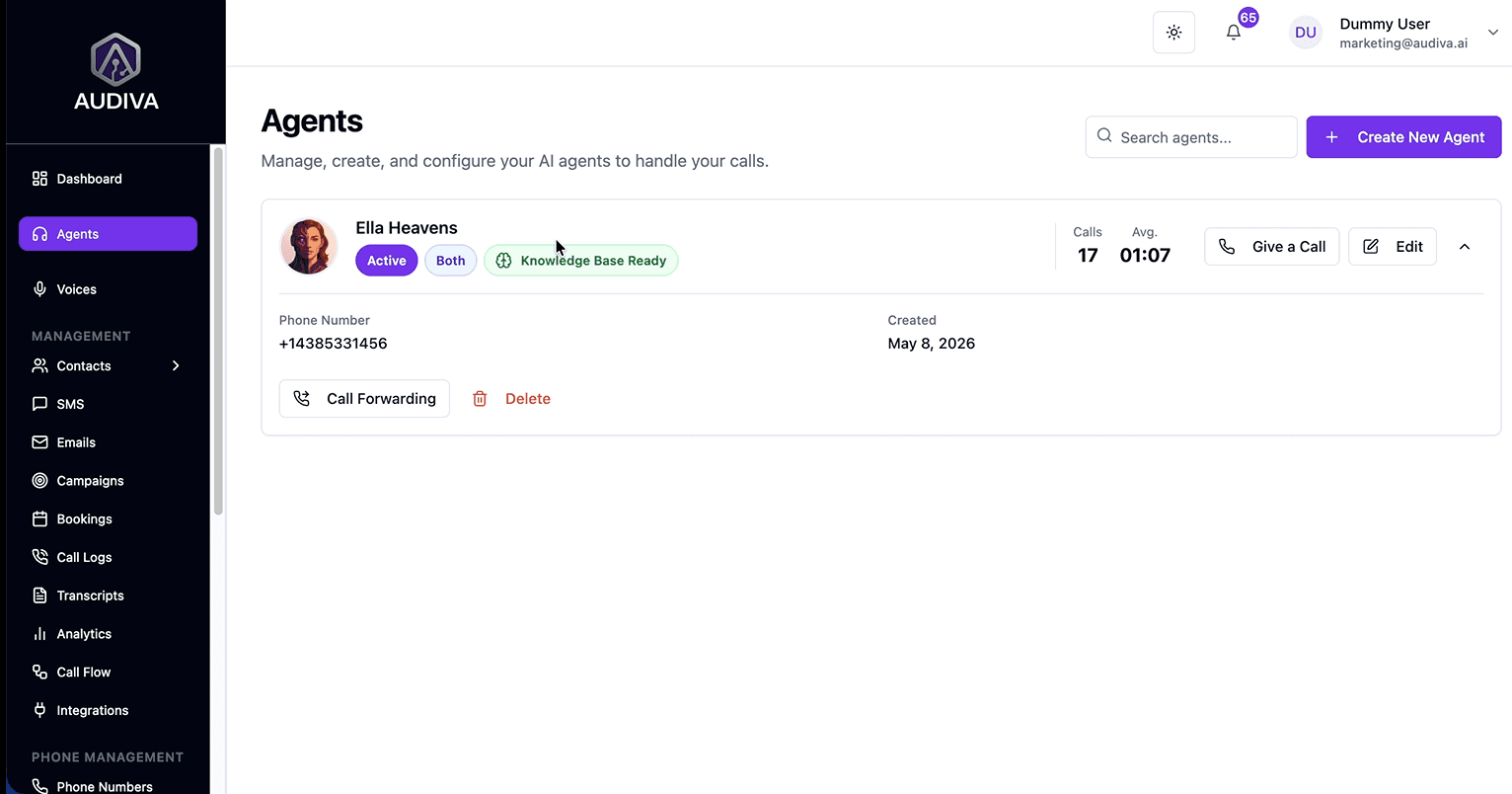
The Audiva Agents dashboard: create and configure AI agents that handle your calls and manage bookings automatically.
The AI receptionist platform’s sidebar, which you, as a business owner, select, gives you a full operational view: Agents, Call Flows, Bookings, Transcripts, Analytics, Integrations, and more. Everything your automated booking system touches is visible and configurable from one place.
Customizing Your AI Call Flow
The call flow is your agent's brain. It defines exactly what the AI says, what questions it asks, and what actions it takes at each stage of a conversation. Audiva lets you build these flows visually. or generate them instantly with AI.
Building a Flow with AI Generation
After finalizing your agent from your dashboard, a call flow is generated by AI based on your instructions as follows
Track “Call Flows” from the left sidebar of the dashboard. Inside Call Flows, two options are available under your agent’s name: Inbound Call Flows and Outbound Call Flows.
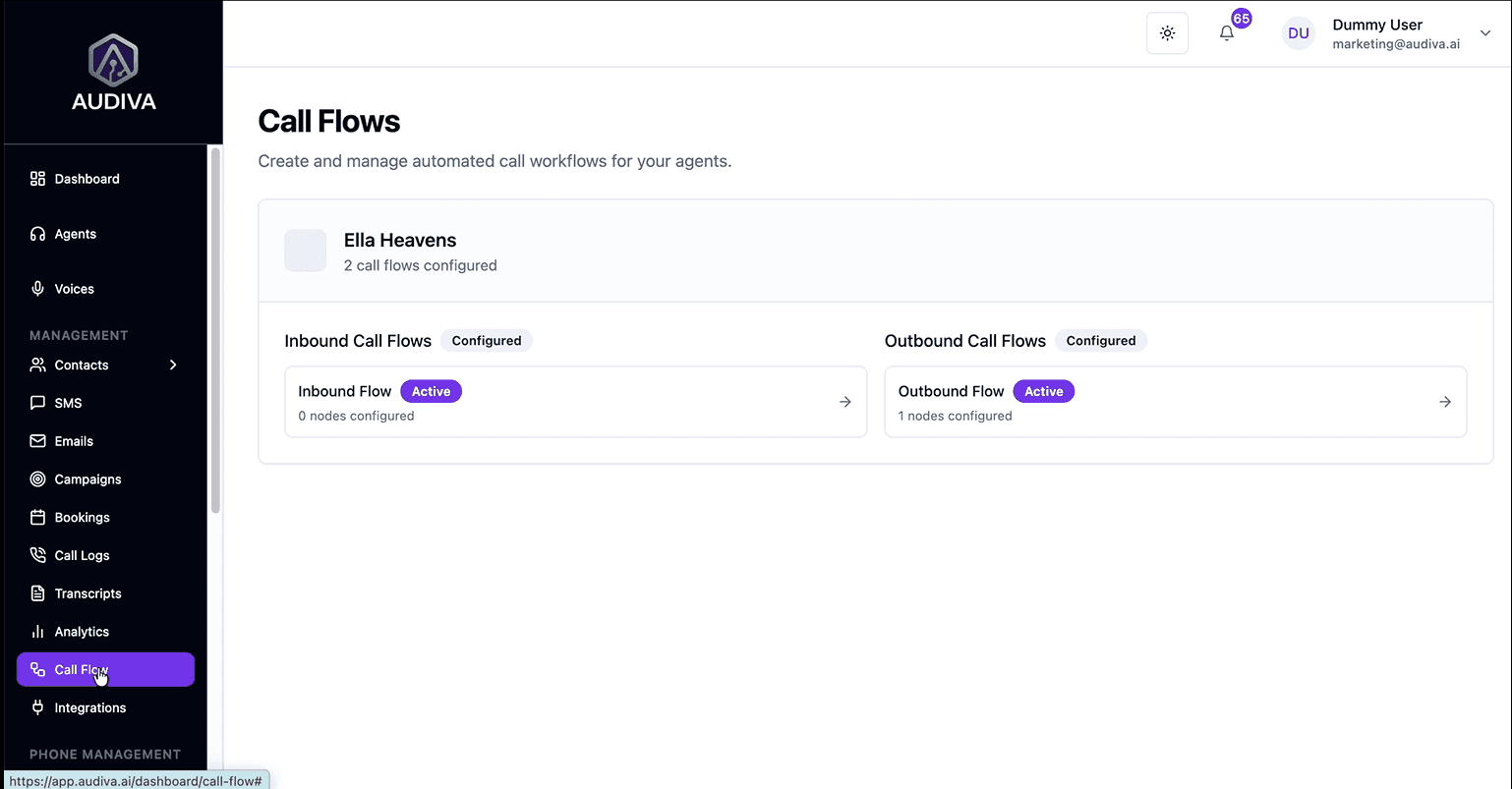
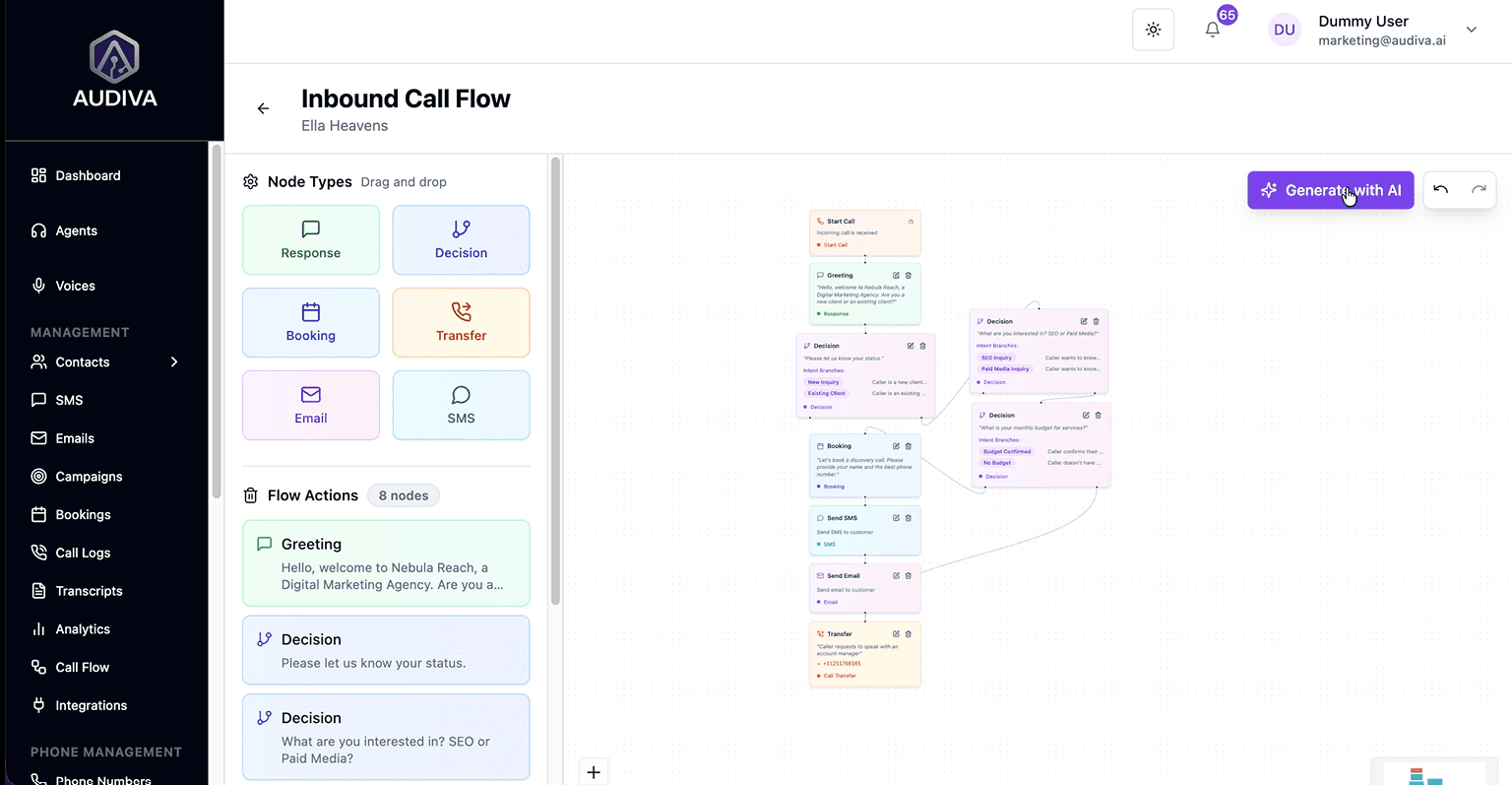
Let's take “Inbound Call Flow” visuals here to give a whole view of how bookings after taking queries from the clients are automated. For that, go to Inside Call Flow → Inbound Call Flow, click the "Generate with AI" button.
A dialog appears prompting you to describe your ideal inbound call flow in plain language. Audiva's AI then builds the entire node structure for you. In the "Generate Call Flow with AI" dialog, describe your booking process in plain English and let the AI build the flow structure.
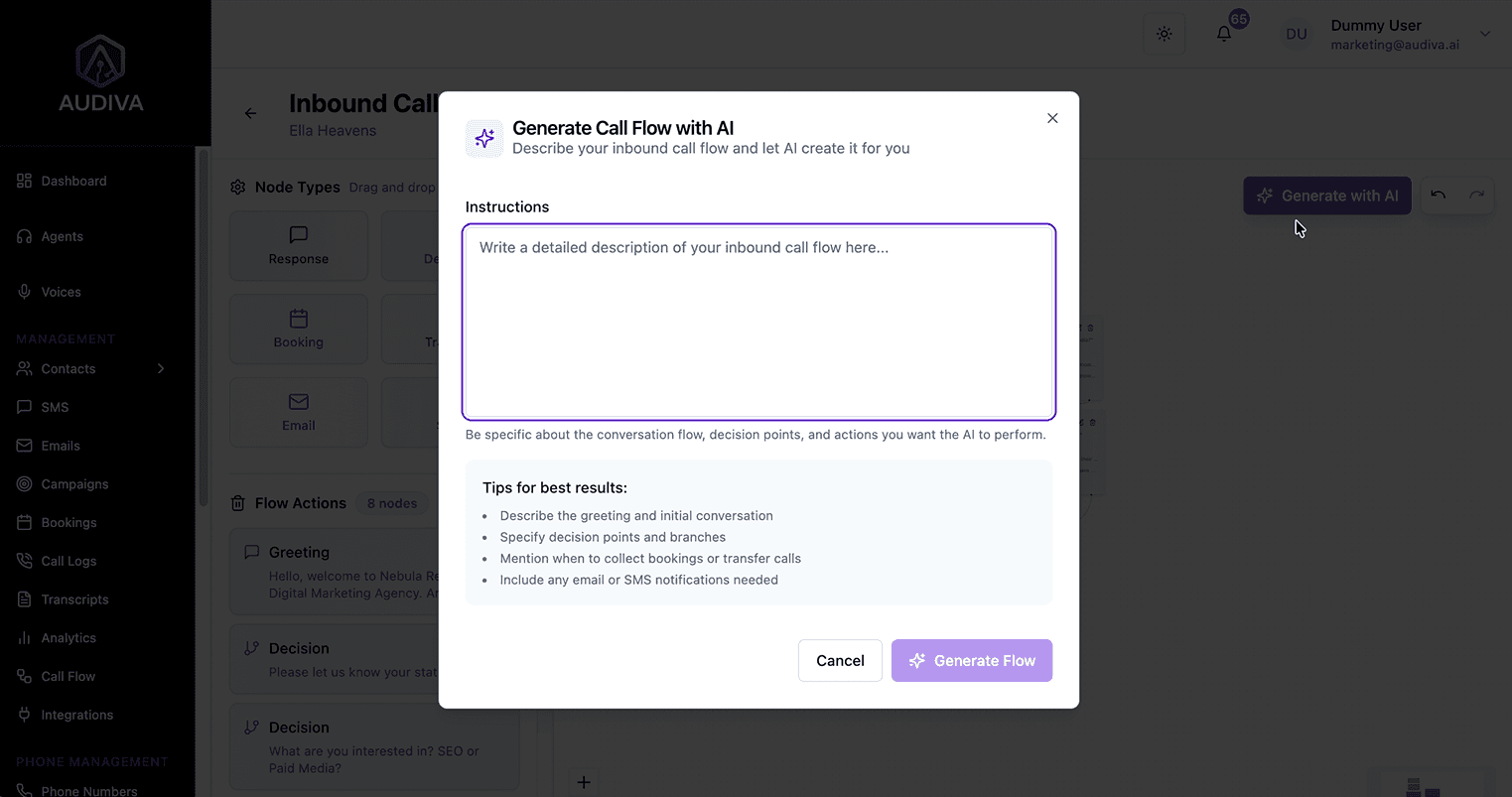
The more specific your instructions, the better the flow. Audiva's tips for the best results are worth following closely
1. Describe the greeting and initial conversation
Set the tone and tell the agent how to open the call (e.g., "Welcome to [Business], are you calling to schedule a consultation?").2. Specify decision points and branches
Tell the AI what to do if a prospect is a returning customer vs. a new lead, or if they want a call vs. an in-person meeting.3. Mention when to collect bookings or transfer calls
Instruct the agent to check calendar availability and lock in a time before ending the call.4. Include any email or SMS notifications needed
The agent can trigger automated messages post-booking to keep both the prospect and your team informed.
Node Availability
The flow builder supports six node types
Response (AI speaks), Decision (branching logic), Booking (locks in an appointment), Transfer (hands off to a human), Email, and SMS. A well-built booking flow typically uses all six.
The Inbound Call Flow builder
Drag and drop node types to design your ideal booking conversation, or let AI generate the structure. You can provide the AI with specific scheduling preferences; for example, "Only book morning slots on Tuesdays and Thursdays" or "Never schedule back-to-back calls." The agent will respect these rules automatically within the flow.
Seamless Integrations
An AI booking agent is only as powerful as the tools it connects to. Audiva's Integrations hub lets you link your calendar, CRM, and communication platforms so data flows automatically, no manual exports, no copy-pasting. Audiva's Integrations hub connects Google Calendar, HubSpot, Zapier, Make, n8n, Slack, Calendly, and more. Navigate to Integrations in the left sidebar. You'll see the full directory of available connections.
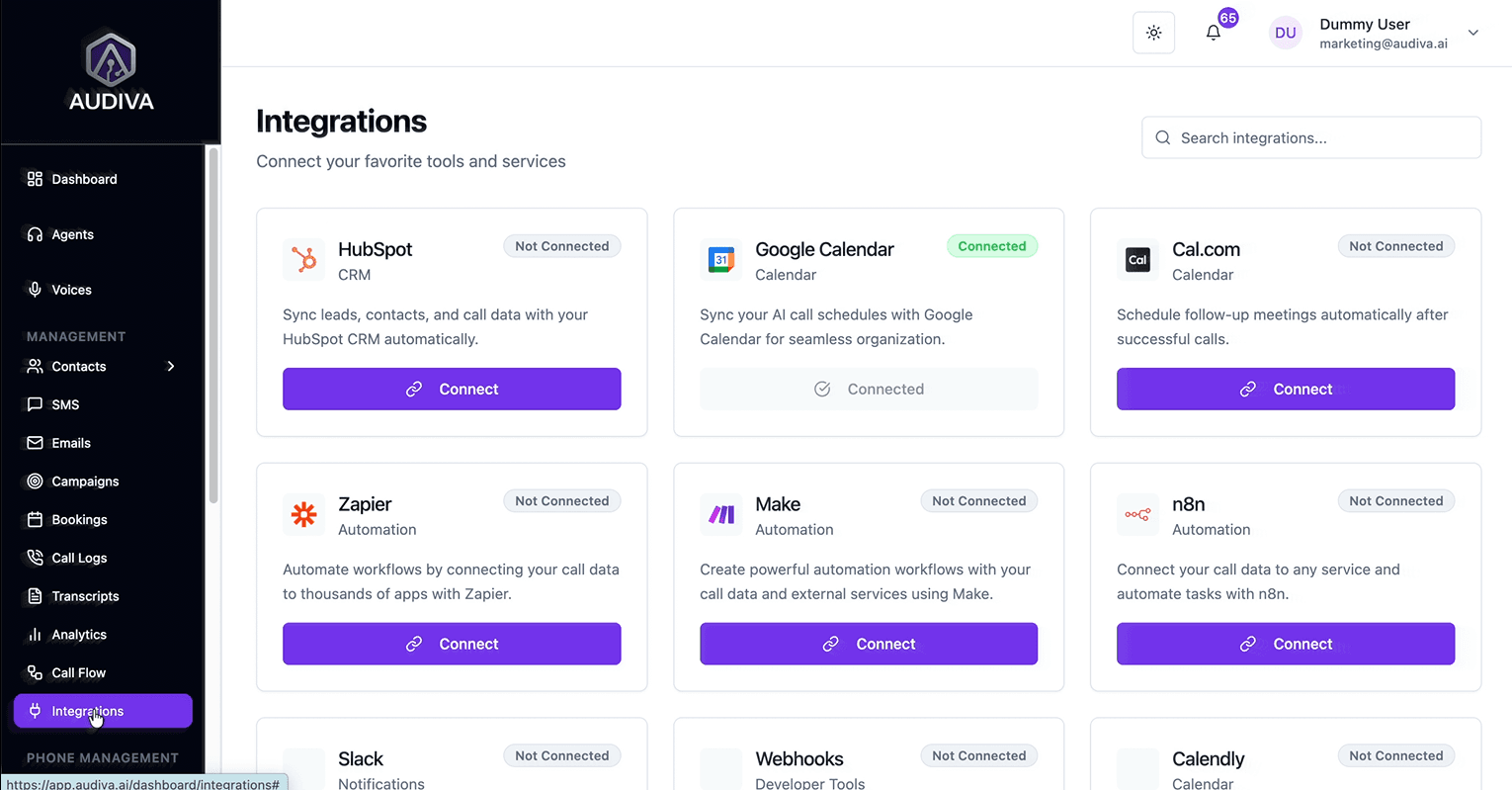
The most impactful integration for scheduling is Google Calendar, and Audiva shows it as "Connected" by default in the demo. Once connected, the AI agent checks your calendar in real time before proposing any time slot, ensuring it never double-books or offers unavailable windows.
Managing Confirmed Bookings
Once your call flow is live and integrations are connected, appointments start populating automatically. The bookings module is your central hub for everything scheduled.
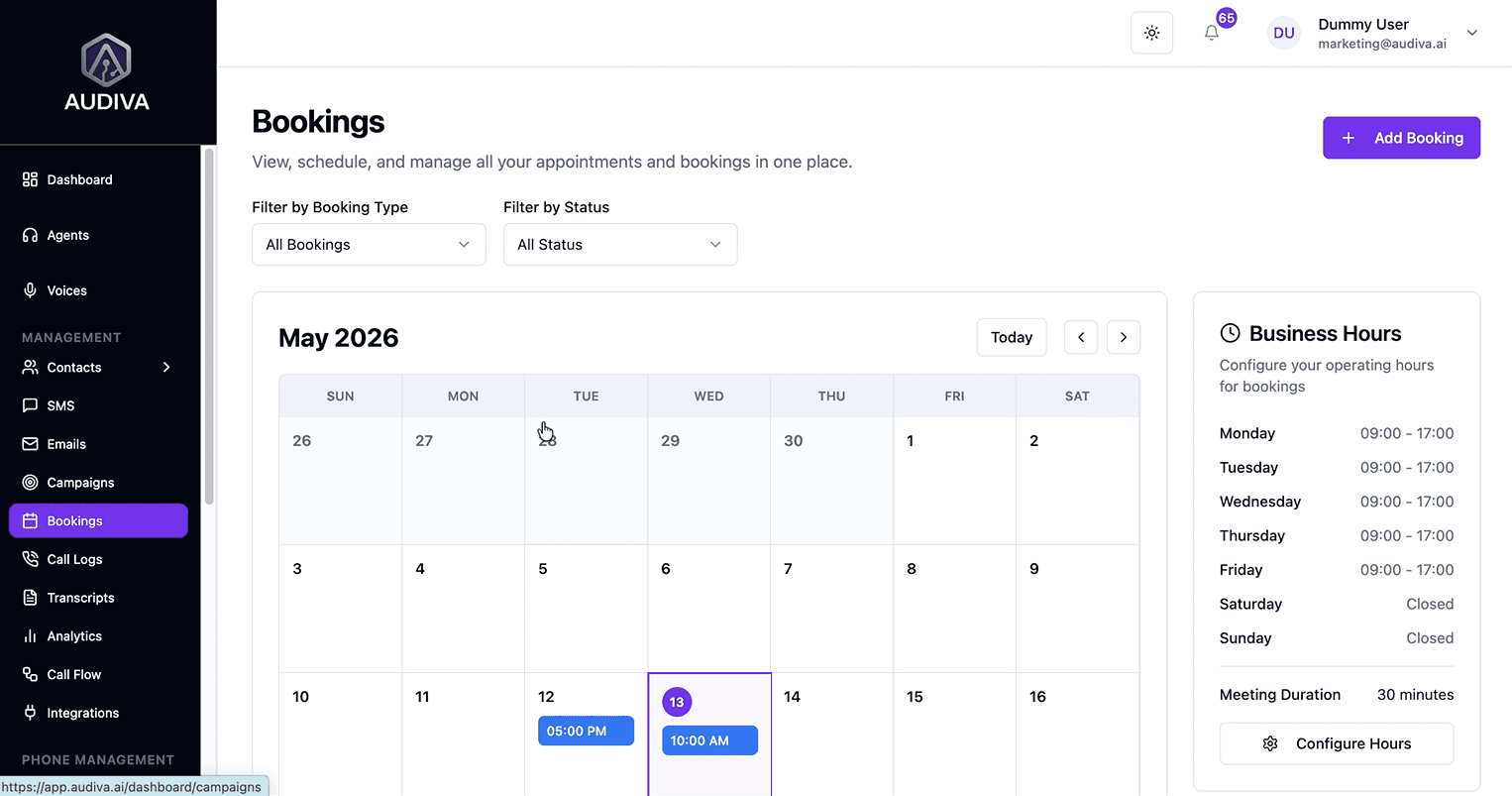
In the Bookings calendar view, confirmed appointments appear automatically, color-coded by type. Business hours are configured on the right panel.
The calendar displays all confirmed appointments with date, time, and booking type. A Business Hours panel on the right lets you define operating windows (e.g., Mon–Fri 09:00–17:00) and set your default meeting duration. The AI respects these boundaries; it will never offer slots outside your configured hours.
Reviewing Booking Details
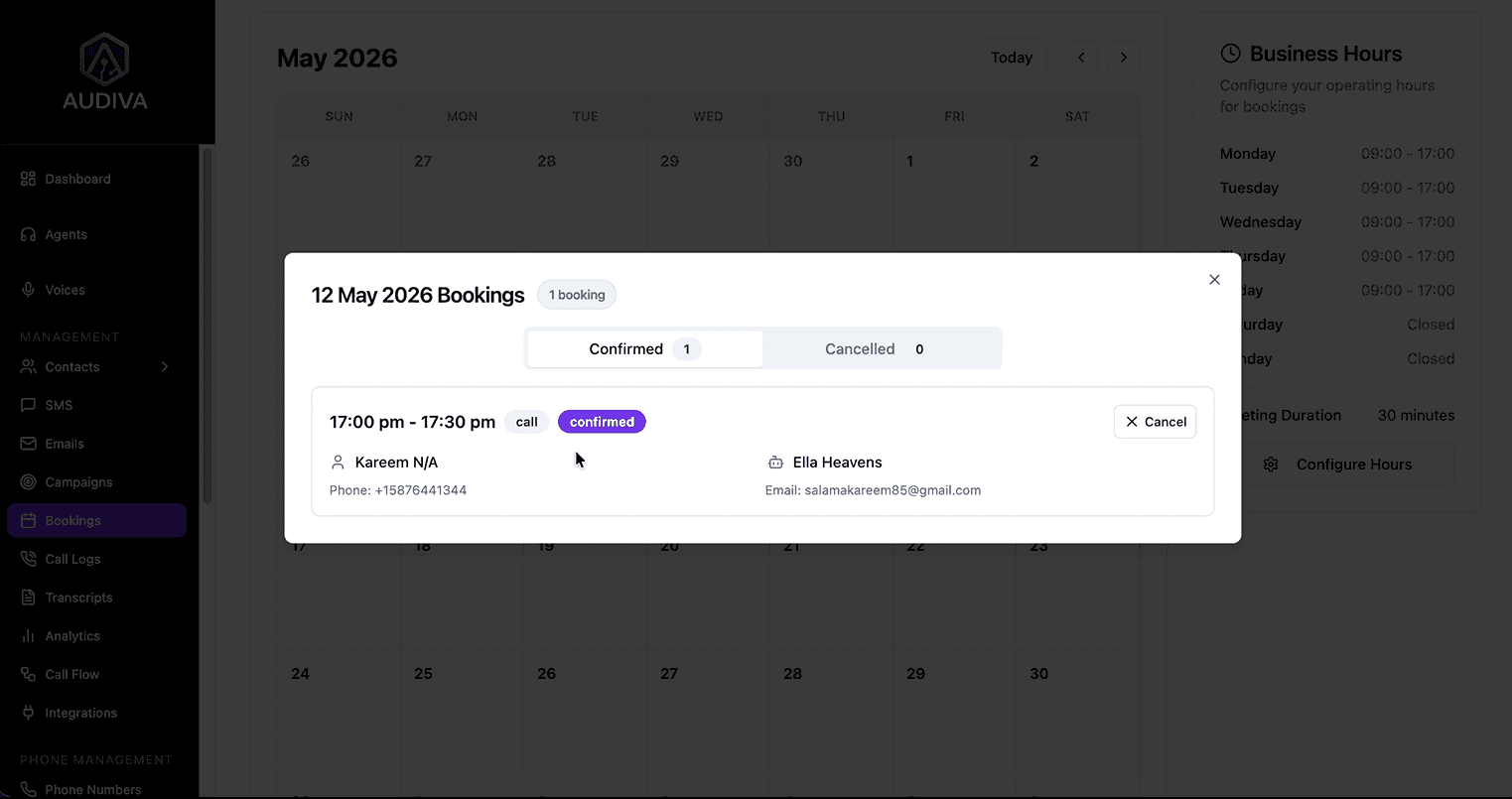
Click any appointment on the calendar to open the booking detail modal. For each confirmed booking, Audiva automatically captures and displays:
Client name: collected by the AI during the call
Contact number: captured for SMS follow-up and sales outreach.
Email address: used for confirmation emails and CRM syncing.
Agent assigned: Which AI agent handled the booking?
Booking status: Confirmed or Cancelled, with the ability to manually cancel from this view.
All data captured during the call, name, number, and email, is automatically populated in the booking record. No manual data entry required from your team.
Post-Booking Automation
The booking confirmation is just the beginning. What happens next, to both the prospect and your internal team, is where Audiva's automation really earns its keep.
Automated SMS Confirmations for Prospects
By adding an SMS node at the end of your call flow, the AI automatically fires a confirmation text to the prospect immediately after the booking is locked in. This message can include the date, time, location (or call link), and any prep instructions, all populated dynamically from the booking data.
Prospects who receive immediate confirmation are significantly less likely to no-show. The SMS node can also be configured to send reminder texts 24 hours and 1 hour before the appointment.
Internal Briefs for Your Sales Team
Simultaneously, an Email node in the same flow sends an internal brief to the relevant salesperson or team inbox. This brief contains everything captured during the call: the client's name, number, email, stated interest, and the scheduled appointment time. The sales rep walks into the call fully briefed, with no cold handoffs.
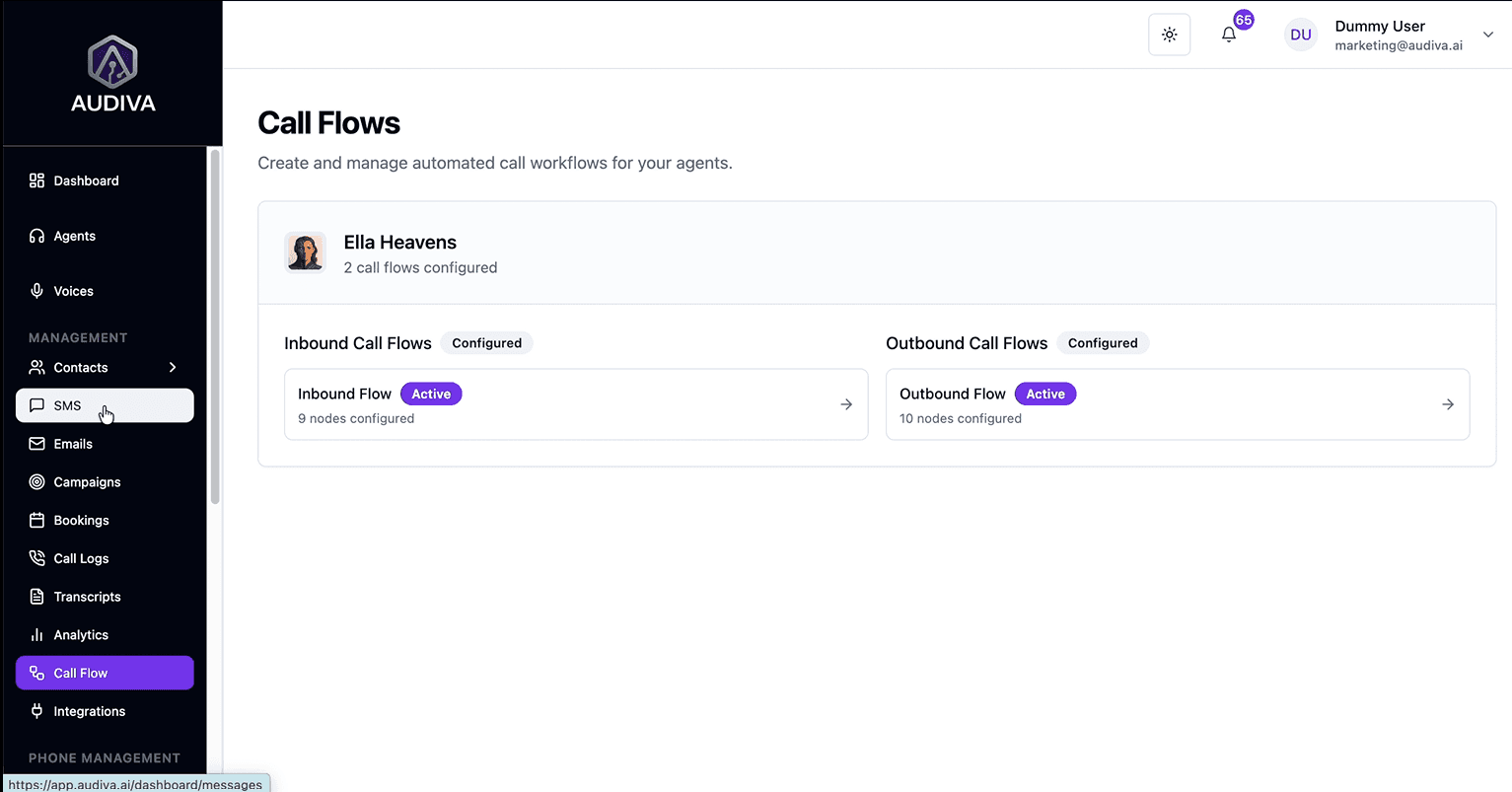
The Call Flows overview, both inbound and outbound flows, is active and configured. Inbound handles booking; outbound handles confirmations and follow-ups. Your outbound call flow can be configured to automatically place follow-up calls to no-shows or leads who didn't complete a booking on the first attempt, closing the loop without any human intervention
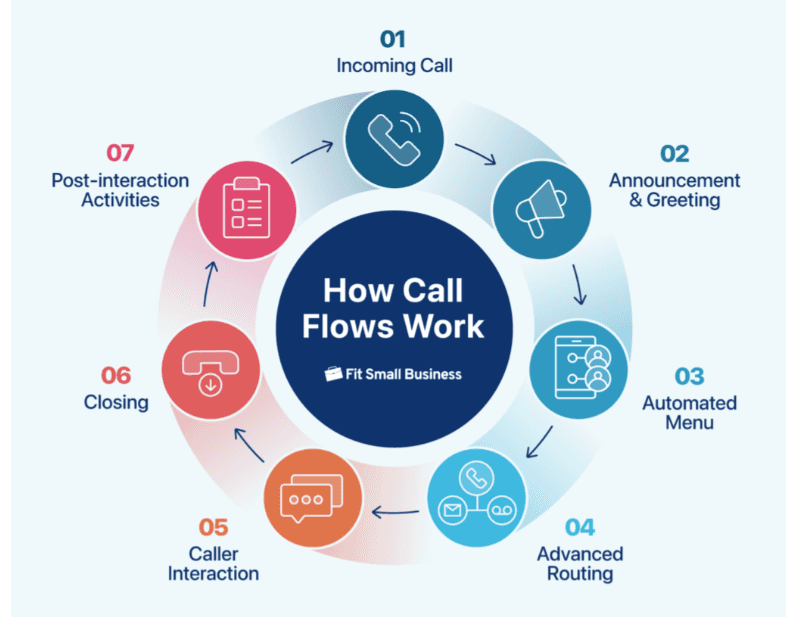
Conclusion: Full Automated Booking Cycle
How to Setup Appointment Bookings in Audiva.ai?
Frequently Asked Questions
How does the AI know when I am available?
The AI agent integrates directly with platforms like Google Calendar or Calendly to gain real-time visibility into your current time slots. Once connected, it checks availability dynamically before proposing any booking window, so it will never offer a slot that's already taken.
What information does the agent collect from prospects?
The agent is trained to capture essential details, including the client's name, contact number, and email address. These fields are automatically populated in the booking record and can be synced to your CRM via the HubSpot integration.
Does the sales team get notified of new appointments?
Yes. The platform automatically sends an internal brief containing all captured data to the sales team once a booking is finalized. This is handled by an Email node in your call flow and can be directed to any inbox or Slack channel.
Can I set specific rules for when the AI schedules meetings?
Yes. You can provide the AI assistant with specific instructions within the call flow to prioritize certain intervals or preferences; for example, morning-only slots, specific days of the week, or minimum buffer time between calls. The AI respects these constraints automatically.
Is there a way to review what the AI said on a call?
Yes. The Transcripts section in the sidebar provides a full text log of every call handled by your AI agent. You can use these to audit performance, refine your call flow, and improve agent responses over time.
About The Author

Ibrahim
CEO/Founder



Background Story


Related Articles

features/24 7 Availability
Why Businesses That Answer First Win More Customers
Answer every call, day or night. Learn how AI call handling helps businesses respond faster, capture more leads, and convert more customers 24/7.
Ibrahim

features/24 7 Availability
The Hidden Cost of Missed Business Calls for a Business
Missed calls may cause significant revenue loss for a business. Thus, an AI receptionist is a must to handle all these missed calls with 24/7 automation to capture every lead.
Ibrahim

Ready to See Audiva in Action?
Reading about AI receptionists is one thing. Hearing one handle a real call is something else.